You know the moment. The graph has grown to a hundred and fifty concepts, you have been working in one corner of it for an hour, and you want to get back to the idea you started from. You know it is “over there somewhere”. You click through two or three nodes, each one opening onto a view you half recognise, and at the third you realise you no longer know which way “back” is. The knowledge is all there. What has gone is your sense of where you are in it.
This post is about that moment: why it happens, what a century of research on finding your way says about it, and what Knogra does about it. The short version is a map that never turns. The long version is below.
What a place needs before you can find your way in it
Your brain is very good at remembering where things are. It is the oldest kind of memory we have, old enough that the method of loci, the memory palace, works by borrowing it: attach an idea to a place, walk the place, and the ideas come back in order. Knogra’s scenes are built on the same borrowing. A concept has a view of its own, you arrange its neighbours around it, and after a while you remember a concept partly by where it sat and how you reached it.
But spatial memory has a precondition, and it is easy to state. The place has to hold still. When you turn around in a room, the door you came through is behind you, and it stays behind you when you walk on. If it did not, if every time you stepped into a new room the previous one rearranged itself, you would not have a sense of place at all. You would have a sequence of unrelated pictures.
The research on wayfinding is largely a study of this precondition. Edward Tolman, in 1948, argued from rats in mazes that animals do not learn routes as chains of turns but build something more like a map, a representation in which places have positions relative to each other, so that a shortcut never travelled before can be found. Kevin Lynch, in The Image of the City, asked people to draw their own cities from memory and found that what they drew was built from a small set of elements, among them landmarks, the distinctive things you orient by, and paths, the lines you move along, and that a city was legible in proportion to how consistently those elements related to each other. And a body of work on “you are here” maps, begun by Marvin Levine in the early eighties, found what every lost visitor to a shopping centre already knows: a map that is not aligned with the world in front of you is much harder to use than one that is, even if it is otherwise identical. People reading a misaligned map make systematic errors and set off in the wrong direction. The information is all on the map. What has gone is the correspondence between the map’s directions and theirs.
Put those three together and you have a specification for a navigable space. Positions must be relative and stable, so that a map can form at all. There must be landmarks to orient by. And the directions on whatever you are looking at must agree with the directions you have already learned, or the map fights you.
Where free layouts stop being a landscape
A scene in Knogra is a free layout. That is its strength: it is the place where you arrange a concept’s neighbourhood to answer a question, put the three competing theories in a row, hang the counterexamples underneath, give an equation its own corner. Nothing about this is going to change, and the first half of any serious graph is built this way.
But each scene is its own layout. When you travel from one scene to the next, the transition animates the concepts the two scenes share from their old positions to their new ones, and that animation gives you continuity for as long as the two layouts roughly agree about where things are. The more you shape a scene to its own question, the less its neighbour’s layout agrees with it, and the more the shared concepts have to travel during the transition. At some point the concept you were just standing on arrives somewhere you did not expect, and the room has rearranged itself behind you.
You can hold the layouts in agreement by hand, scene by scene, and for a small graph that is fine. For a large one it becomes a second job, and most people, reasonably, stop doing it. The scenes stay excellent as study views and stop working as a landscape. The specification above is not met: positions are not stable across views, and the directions on the next view do not agree with the directions you learned on the last.
The Helicopter view
The Helicopter view is the landscape. It is a second way of looking at the same graph, and it is built automatically: there is nothing to arrange before it works.
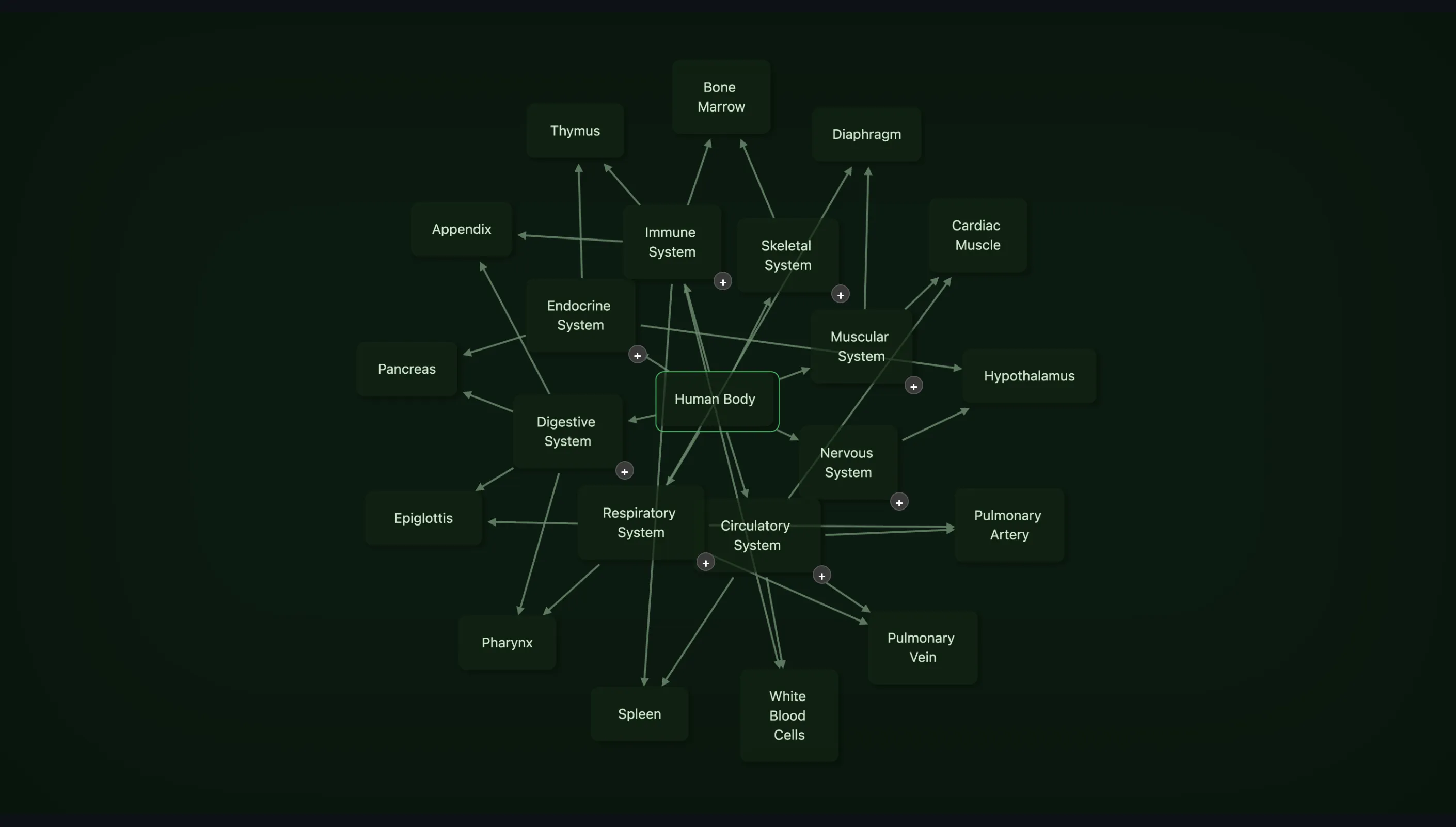
Here is the same concept twice. First, Human Body as a scene into which its eight systems and a couple of dozen organs have been pulled. Every node is readable and every connection is drawn, and the picture has stopped saying which belongs to which: the arrows cross, the systems sit wherever there was room, and nothing about the layout tells you where Human Body ends and the respiratory system begins.
Then the same concept as the Helicopter view shows it: Human Body at the centre, its eight systems around it, each in the direction the graph gives it, and each system’s organs fanned out beyond it as miniatures.
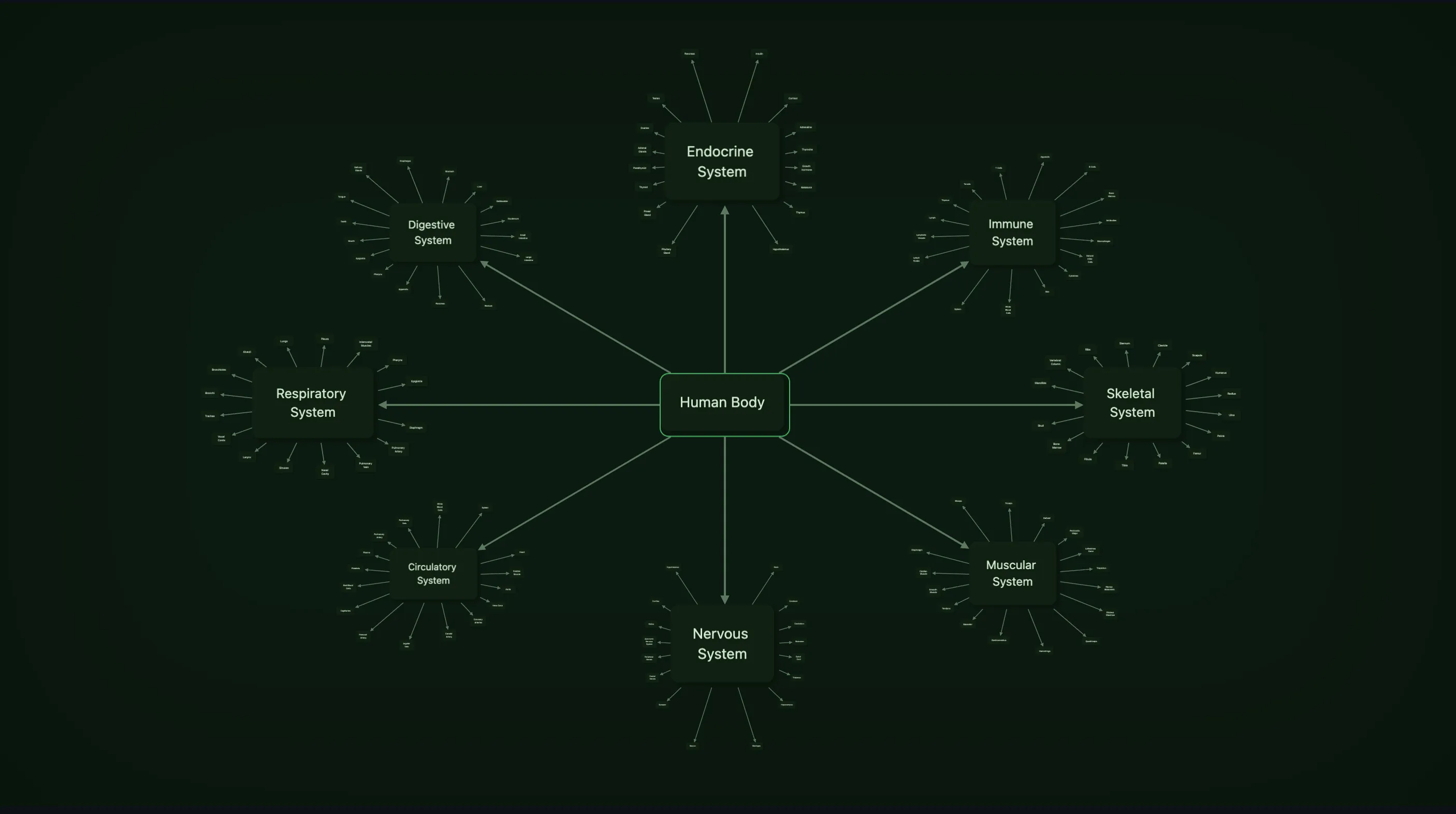
Open it from any scene, and you see a map centred on that scene’s concept, called the focus. Around it, on a ring, sit its direct neighbours, drawn at full size: these are the landmarks, and they are the things you navigate by. Beyond each landmark, fanned out on its far side, sit that landmark’s own neighbours, drawn as miniatures: the markers. A marker is the concept drawn small rather than a symbol standing in for it, so a concept you know by its shape or colour is recognisable at a glance even at that size. Two steps out from the focus is as far as a map goes. That is deliberate. A map that showed everything would be the hairball every graph tool eventually shows you, and the point of a map is what it leaves out.
Every concept has a map, and the map always exists, because it is derived from the graph: from which concepts are connected to which, and from one more thing, which is the whole idea.
Every connection in the graph has a fixed direction. Not the direction an arrow points, which says what the relationship means, but a compass bearing: the angle at which this connection leaves each of its two ends. Think of it as north-east from Calculus to Limits, south-west from Limits back to Calculus. That bearing belongs to the connection, not to any one map, so wherever the connection is drawn, on the map of Calculus, on the map of Limits, on the map of some third concept where both appear as markers, it is drawn at the same angle.
The consequence is the thing this post is about. When you move from one concept to its neighbour, the map does not turn. The focus slides to where the neighbour was, the neighbour grows into the focus, the old focus shrinks into a landmark, and it is sitting exactly where the geometry says it must: on the reverse of the bearing you just travelled along, which is to say behind you. The landmarks around the old focus that were not neighbours of the new one shrink into markers; the new focus’s own neighbours, which were markers a moment ago, grow into landmarks. Everything that stays on screen stays on its own ray. Distances change, sizes change, directions do not.
One minute of the Helicopter view: entering from a scene, moving between concepts, leaving for a scene. No narration.
This is the precondition from the first section, met by construction. Positions are relative to the focus and stable in direction across every map. The landmarks are landmarks. And the directions on the map you have just arrived at agree with the directions on the map you left, because they are the same directions. After a few moves you are not reading a view any more; you are moving through a place.
A word on something you will notice quickly. Concepts in a real graph are connected in triangles and loops, and on a map that means one concept can appear twice: as a landmark, because it is a neighbour of the focus, and as a marker under another landmark, because it is also that landmark’s neighbour. Both copies are the real concept, and both are drawn at the bearings their connections carry, so they point at each other across the map. This is not a glitch to be tidied; it is the map telling you there is a shortcut, which is exactly the thing Tolman’s rats could find and a chain of turns cannot represent.
Finding your way around it
The terms you will meet, once:
| Term | What it is |
|---|---|
| Focus | The concept at the centre; “the map of X” means the map focused on X |
| Landmark | A direct neighbour of the focus, drawn full size on the ring. The only thing navigation targets |
| Marker | A neighbour of a landmark, drawn as a miniature in that landmark’s fan |
| Ring | The ellipse the landmarks sit on |
From a scene, right-click the canvas and choose Helicopter view, or press the slash key. The map opens on that scene’s concept. From here:
| Do this | To |
|---|---|
| Double-click a landmark | Make it the focus |
| Click a landmark or marker | Select it, for the keys below |
| Hover over a marker | See its title |
| Right-click or double-click a marker | Enlarge it in place to read it, and again to shrink it back |
| Arrow keys, or H J K L | Walk the map: left and right around the ring or around a fan, down a level out, up a level in. A marker you walk onto enlarges by itself |
| Space | Enlarge or shrink the selected concept |
| G | Make the selected landmark the focus |
| [ and ] | Back and forward through the concepts you have focused on |
| = and -, then F | Zoom in or out about the focus; F returns to the standard frame |
| Enter | Leave the map for the focus’s own scene |
| Escape | Go back to the scene you entered from |
Two things about leaving. Enter takes you to the scene of whatever concept you are focused on, so the map is a way of getting from any scene to any other without knowing the route: up into the map, two or three moves to the concept you want, down into its scene. And if the concept has no scene yet, Enter creates one, in Edit mode, laid out as the map showed it: the concept in the centre and its neighbours around it at their bearings. You then build the scene from there with the scene’s ordinary tools, and when you later come up into the map from it, nothing has to travel far, because the scene began as the map.
The reverse exists too. A scene you have edited out of all resemblance to its map can be put back: under Scene design, in the Auto-layout menu, Reset to map shape returns the scene to the map’s geometry, keeping its theme, background and title. Whether you want that depends entirely on what the scene was for, which is why it is a command and not something the app does for you.
Making the map yours
Everything above works on a graph nobody has touched. The directions are chosen automatically, spread evenly into whatever room each concept has, and for most graphs the automatic map is a good one. But a map you have adjusted is a map you remember better, and the adjustments are few and simple. They need Edit mode; in View mode the map is a map and nothing moves.
Drag a landmark around the ring, and you have changed the bearing of that connection. Not on this map: everywhere. Every other map that draws that connection will draw it at the new angle the next time you open it. This sounds drastic and is the opposite. There is one direction for one connection, so fixing it once fixes it in every view, and you can never end up with two maps that disagree. Drag it in or out and you have changed its distance, which is local to this map, since how far a concept sits from you is a fact about this view and not about the relationship.
A landmark’s fan moves with it when you drag it, keeping its own bearings. A marker can be dragged too, and the same rule applies: its direction is the connection’s and changes everywhere, its distance is this map’s.
Sizes have keys. W and Shift+W enlarge or shrink all the landmarks on this map; M and Shift+M do the same for all the markers. With a concept selected, > and < change its size alone, and , and . pull it in toward its parent or push it out, a landmark taking its whole fan with it. Everything you set this way is remembered for this map and survives the automatic layout’s own adjustments, so a landmark you made bigger stays bigger when the ring gets busier.
When a map has become more yours than you intended, the map’s menu offers a reset: distances and sizes back to automatic, or directions too, and the second one tells you honestly that it reaches other maps as well, because directions are shared. It keeps the order of your landmarks around the ring while re-spacing them evenly, so a sequence you arranged on purpose survives the tidying.
One more thing worth knowing, because it is the one place the map is allowed to bend its own rule. When several landmarks would land on top of each other on a crowded ring, the map draws them slightly apart, by a bounded amount, without changing their stored directions. So on a busy concept a landmark may sit a few degrees from where its bearing says, and on the next map it is back where it belongs. The alternative was letting landmarks overlap, and a landmark you cannot read is not a landmark.
Two more things it is for
The map has a quiz. Start it from the map’s menu and a share of the graph’s concepts, from the whole graph rather than one scene, are hidden; you walk from map to map by re-focusing and name what has been masked. A quiz on a scene tests whether you remember what was in a room. A quiz on the map tests whether you remember the shape of the territory, which is a different and harder thing, and the one that tells you whether the landscape has actually formed.
And the map is a check on the graph itself. Scenes show what you chose to put in them. The map shows what is actually connected to what, with nothing included or left out, and at two steps’ distance. A concept whose ring has twenty landmarks is a concept doing too much. A concept that appears as a marker under three different landmarks is at the centre of something you may not have named yet. A fan with nothing in it is a leaf, which may be right, or may be a concept you never came back to. None of this is visible from inside a scene, where the layout is the author’s and the author is you.
Scenes and maps
None of this replaces scenes. A scene is where you think: where the arrangement of a dozen concepts is itself a statement about them, where there are images and equations and backgrounds and the layout follows the question. The map is where you go when you have stopped thinking about one thing and need to find another, or need to see how the parts you have been thinking about separately fit together. Up into the map, across, down into a scene. The two views draw the same graph, and the map is the one that holds still.
Which brings us back to the hour in one corner of a hundred and fifty concepts. Press the slash key. The concept you are on is in the centre of its map, and the one you came from an hour ago is two or three moves away, in the direction it has always been in. Go there.